

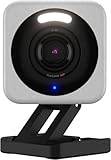
The Wyze Cam v4 is genuinely good for $36. 2.5K resolution, color night vision, local storage via microSD – it outperforms cameras that cost two or three times as much. But before you buy one, you need to know about the subscription situation (the free tier is nearly useless) and a 2024 privacy incident that Wyze has never fully addressed. Eyes open.
TL;DR
- 2.5K QHD (2560×1440) resolution, 130-degree FOV, color night vision with built-in spotlight
- Local storage via microSD (up to 256GB) – no cloud required for recordings
- Free tier: 12-second event clips with a 5-minute cooldown between alerts. That’s it.
- Cam Plus subscription unlocks continuous recording, AI detection, and actually useful alerts
- Works with Alexa and Google Home natively; HomeKit is not supported
- February 2024: ~13,000 users briefly saw thumbnails from other people’s cameras. Wyze fixed it, but the trust damage is real.
- For the price, it’s still the best budget security camera you can buy – just go in with your eyes open
Wyze Cam v4 Specs (What Changed From v3)
The v3 was already a solid camera. The v4 bumps resolution from 1080p to 2.5K QHD (2560×1440), which makes a real difference when you’re trying to read a license plate or identify a face. The sensor upgrade also improves low-light color accuracy – the v3’s night vision was fine, the v4’s is noticeably better.
Other specs: 130-degree field of view, f/1.6 aperture, built-in motion-activated spotlight and siren, two-way audio, IP65 weather resistance, USB-C power (6-foot cable included), and microSD support up to 256GB. Wi-Fi 6 support on the v4 means fewer connectivity headaches if your router is modern.
It’s a wired camera – no battery option. That’s a fair tradeoff at this price. If you need outdoor wireless, look at the Blink Outdoor 4 or Eufy 2C Pro. For indoor use or spots near an outlet, the v4’s wired connection is more reliable than battery cams anyway.
Video Quality and Night Vision
Daytime footage is genuinely impressive at this price point. The 2.5K resolution holds up when you zoom in on the app, and the wide FOV covers a decent chunk of a room or driveway without the fish-eye distortion you see in some cheap wide-angle cams.
Night vision is where Wyze made the biggest improvement. The v4 uses a starlight sensor that captures color in very low ambient light – not just the grey-green of traditional IR night vision. When the spotlight kicks in, you get clear color footage even in full darkness. Motion-triggered spotlight means it’s not burning 24/7.
The Smart Focus feature on live view lets you tap to zoom in on moving objects while keeping the full-frame view. Useful when you’re watching a live event and want detail without losing context. It’s a minor feature but one you’ll actually use.
The February 2024 Privacy Incident
In February 2024, after an AWS outage, approximately 13,000 Wyze users logged back into the app and briefly saw thumbnail images from other users’ cameras. Some could also view event clips from strangers’ feeds. This affected roughly 0.25% of Wyze’s user base, but the nature of the failure – a caching bug exposing live home footage across accounts – is the kind of thing that should give anyone pause.
Wyze acknowledged the incident, fixed the bug, and sent notifications to affected users. But their initial public communication was slow and somewhat vague. The company has had prior security issues – a 2019 data breach exposed 2.4 million user records – so this wasn’t a one-off lapse.
This doesn’t make the Wyze Cam v4 unsellable, but it does change the calculus. Put it in your garage or at your front door. Don’t put it in a bedroom or anywhere you’d be genuinely uncomfortable with a stranger seeing the feed. If you’re paranoid about cloud-side exposure, the RTSP firmware option (discussed below in the HomeKit section) lets you route footage locally and skip Wyze’s servers entirely.
Subscription Tiers – What You Actually Get Free vs Paid
This is where a lot of buyers get surprised after purchase. The free tier is not nothing, but it’s close.
Free tier (no subscription):
- 12-second event clips when motion is detected
- 5-minute cooldown after each clip – no new alerts for 5 minutes
- Live view anytime
- Local recording to microSD (continuous if you insert a card)
- No AI detection – just motion alerts with no smart filtering
Wyze Cam Plus ($1.99/month per camera or $5.99/month for unlimited cameras):
- Event clips up to 5 minutes long
- No cooldown – continuous event recording
- AI detection: person, pet, vehicle, package, face recognition
- Smart alerts (person detected vs. generic motion)
- Emergency response integrations
The microSD local recording is the real get-out-of-jail feature on the free tier. A 64GB card (about $10) gives you several days of continuous local footage regardless of the cloud situation. That said, if you want push notifications that actually tell you something useful – and you’re not going to babysit the live feed – Cam Plus is basically mandatory. $5.99/month for unlimited cameras is reasonable if you have three or more Wyze cams.
HomeKit, Alexa, and Google Home Compatibility
HomeKit is not supported and there’s no indication Wyze plans to change that. If you’re in the Apple ecosystem and HomeKit is important to you, look at the Eufy or Eve cam lines instead.
Alexa and Google Home are both supported natively with no workarounds needed. Voice commands, routines, and live view in the respective apps all work. For most people building a mixed smart home, that covers it.
For the technically inclined: Wyze does offer alternative RTSP firmware for the v3 and v4 that turns the camera into a standard RTSP stream. This opens the door to Home Assistant integration, Homebridge (via the homebridge-wyze-smart-home plugin), local NVR setups like Frigate, and pulling the camera entirely off Wyze’s cloud infrastructure. It requires flashing the camera with unofficial firmware and is not plug-and-play, but it’s a real option if the 2024 incident made you uncomfortable with cloud dependency.
Full details on what works and what doesn’t: Does Wyze Work with HomeKit?
Should You Buy It?
At $36, the Wyze Cam v4 is still the strongest budget security camera on the market. The 2.5K resolution and color night vision outperform everything else in the sub-$40 category. Local storage keeps it functional without a subscription. The hardware is genuinely good.
The caveats are real but manageable. The free tier’s 5-minute cooldown makes cloud event clips nearly useless for high-traffic areas – budget for Cam Plus if you need smart alerts. Place cameras thoughtfully given the 2024 privacy incident; skip the bedroom, point it at the front door. If you want HomeKit, look elsewhere.
For a garage camera, a driveway cam, a nursery monitor where privacy stakes are lower, or an office you want to keep an eye on: the v4 is a no-brainer at this price.